
Business Tips
Omago Editorial
.
January 30, 2026
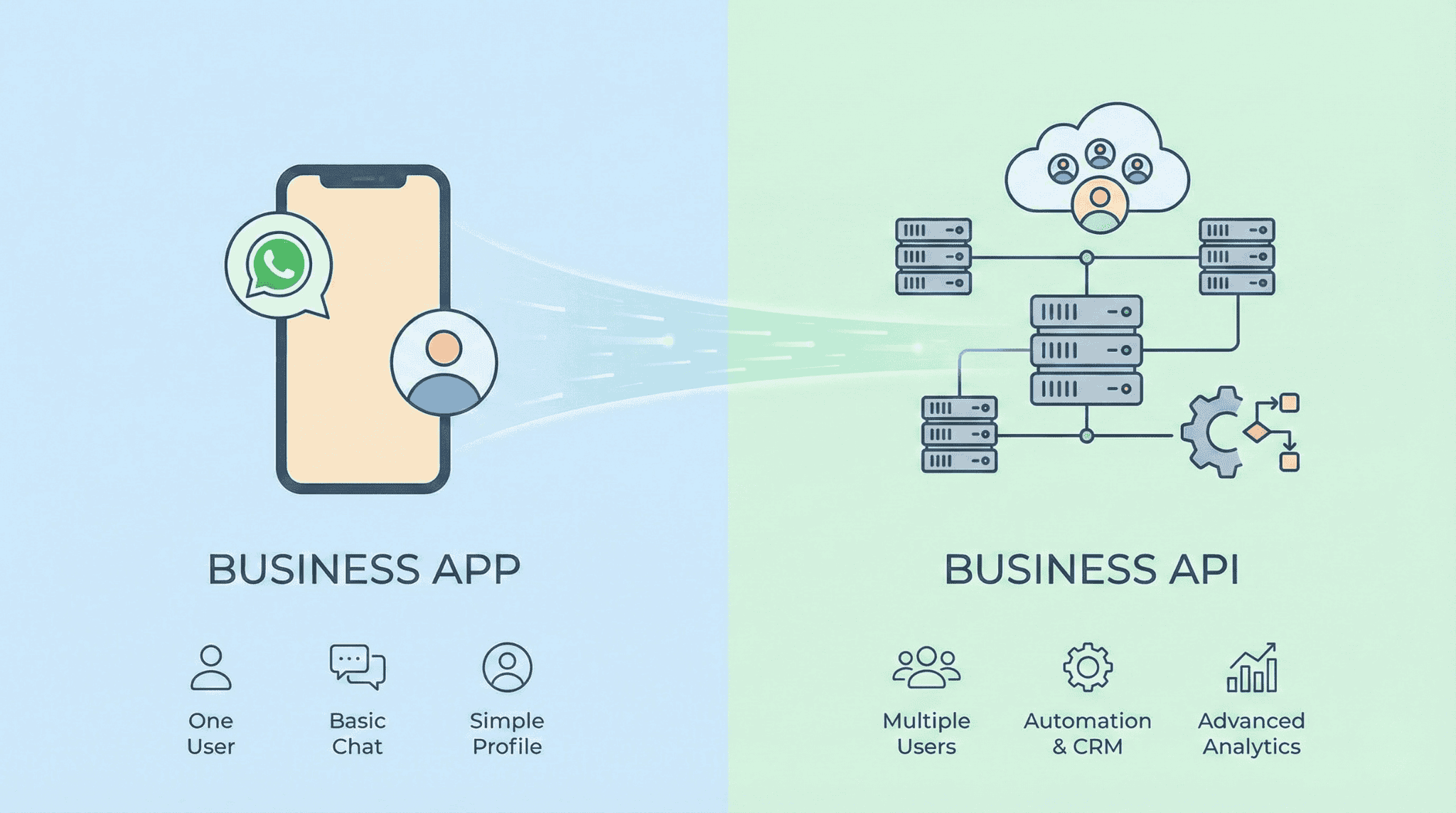
If you use WhatsApp for business, you have two options: the free WhatsApp Business App and the WhatsApp Business API. The naming is confusing, but the differences matter — especially when it comes to automation, team access, and scaling customer conversations.
With over 3 billion monthly active WhatsApp users worldwide (Statista, 2025) and more than 50 million businesses using WhatsApp to communicate with customers (Meta, 2025), choosing the right version is one of the most important decisions a small business can make for its customer service setup.
This guide explains what each does, who each is for, and when to upgrade.
What Is the WhatsApp Business App?
The WhatsApp Business App is a free mobile application available on iOS and Android. It is designed for small businesses where one person manages all customer messages.
What you get:
Business profile (hours, location, description, website)
Away messages and greeting messages
Quick replies (saved responses you send manually)
Labels to organise chats
Basic product catalogue
Broadcast messaging to up to 256 contacts
Key limitations:
One primary device only (plus up to 4 linked devices)
No integration with CRM, helpdesk, or other business tools
No chatbots or automation beyond basic away messages
Broadcast limited to 256 contacts who have saved your number
Minimal analytics
Best for: Solo operators and very small businesses that manage all customer messages personally and receive fewer than 20 messages per day.
What Is the WhatsApp Business API?
The WhatsApp Business API is not an app you download. It is a programming interface that connects WhatsApp to business software through an official provider — sometimes called a Business Solution Provider (BSP).
What you get (in addition to everything in the App):
Multiple team members on one WhatsApp number
Integration with CRM, helpdesk, e-commerce, and booking tools
Advanced automation, chatbot flows, and AI-powered assistants
Bulk messaging to unlimited opted-in contacts
Detailed analytics and reporting
Verified business badge (green tick, if eligible)
Key limitations:
Requires a third-party provider (monthly fees vary)
Meta charges per conversation (pricing varies by country and message type)
Template messages require Meta approval before sending
Setup is more involved than downloading an app
Best for: Businesses that receive significant message volume, need multiple team members on one number, or want automation beyond basic away messages.
WhatsApp Business App vs API: Side-by-Side Comparison
Feature | WhatsApp Business App | WhatsApp Business API |
|---|---|---|
Cost | Free | Provider fee + Meta per-conversation charges |
Devices | 1 phone + up to 4 linked devices | Unlimited users on one number |
Automation | Away messages and quick replies only | Chatbots, AI assistants, automated flows |
CRM integration | No | Yes — connects to most business tools |
Broadcast limit | 256 contacts (must have saved your number) | Unlimited opted-in contacts |
Analytics | Basic (read receipts, message stats) | Detailed reporting and conversation metrics |
Green tick badge | Not available | Available (if eligible) |
AI-powered responses | No | Yes — through providers like Omago |
Setup time | 5 minutes (download and configure) | Hours to 1 day (through a provider) |
Best for | 1-person businesses, low volume | Growing businesses, teams, automation |
How Do You Decide Which Version You Need?
The decision comes down to volume, team size, and whether you need automation. Here is a simple framework:
Stay with the WhatsApp Business App if:
You handle all customer messages yourself
You receive fewer than 20 messages per day
Your needs are straightforward (away messages, quick replies)
Budget is a primary concern and you do not need automation
Move to the WhatsApp Business API if:
Multiple team members need access to the same WhatsApp number
You want AI-powered responses or chatbot flows to handle enquiries automatically
You receive more messages than one person can handle during business hours
You need integration with your existing CRM, booking system, or helpdesk
After-hours messages represent a meaningful portion of your enquiries and you are losing leads overnight
According to IBM, AI chatbots can handle up to 80% of routine customer enquiries without human intervention. If the majority of your messages are repetitive questions — hours, pricing, availability, booking — the API with an AI assistant will handle them more efficiently than manual quick replies.
How Much Does the WhatsApp Business API Cost?
The WhatsApp Business App is free.
WhatsApp Business API costs have three components:
1. Provider fees. Monthly subscription to the platform that connects you to the API. Most SME-focused providers charge between $30–$300 USD per month depending on features and message volume.
2. Meta conversation charges. Meta charges per 24-hour conversation window. Rates depend on the conversation type and country. There are four categories: marketing conversations, utility conversations (order confirmations, shipping updates), authentication conversations (verification codes), and service conversations (customer-initiated support). Service conversations initiated by the customer are currently free for the first 1,000 per month.
3. Setup costs. Some providers charge for initial configuration, though many SME-focused platforms include setup in the monthly fee.
For most small businesses, total monthly cost ranges from $50–$300 USD. Compare this to the revenue lost from unanswered after-hours messages — according to the Harvard Business Review, companies responding within one hour are seven times more likely to qualify a lead than those who wait longer.
How Do You Switch from the App to the API?
If you decide to migrate from the WhatsApp Business App to the API, the process is straightforward:
You can keep your existing WhatsApp number. Most providers handle the migration so your customers do not need to save a new contact.
The transition does not need to happen overnight. Many businesses start with the free app, identify the limitations that affect them, and migrate when message volume or automation needs justify the cost.
Setup through a provider takes hours, not weeks. Platforms built for small businesses — like Omago, a WhatsApp AI assistant platform for SMEs — handle the API connection and let you upload your business information and go live the same day.
Template messages need pre-approval. Any outbound message you initiate (not replies to customer messages) must use a template approved by Meta. Most providers include common templates and guide you through the approval process.
Frequently Asked Questions
Can I use the WhatsApp Business App and API on the same number?
Meta has introduced a "coexistence" feature that allows some businesses to use the same number on both the App and the API simultaneously. However, availability depends on your provider and region. Most small businesses find it simpler to fully migrate to the API when they are ready.
Is the WhatsApp Business API free?
No. While the WhatsApp Business App is completely free, the API involves two costs: a monthly fee to your provider (the platform connecting you to the API) and per-conversation charges from Meta. However, service conversations initiated by customers are free for the first 1,000 per month, which covers most small business volumes.
Do I need technical skills to use the WhatsApp Business API?
No. While the API itself is a technical tool, SME-focused providers handle all the technical setup. You interact through the provider's platform — uploading business information, reviewing conversations, and managing settings — without writing any code.
How many messages can the WhatsApp Business API handle?
The API can handle thousands of simultaneous conversations, making it suitable for businesses of any size. There is no practical upper limit on incoming customer messages. Outbound messaging limits start at 250 unique contacts per day for new accounts and scale up as your account builds a reputation with Meta.
When should a small business upgrade from the App to the API?
The clearest signals are: you are missing customer messages because one person cannot keep up, multiple team members need access to the same number, or you want automation (chatbots or AI) to handle after-hours and repetitive enquiries. If any of these apply, the API will likely pay for itself through recovered leads and improved response times.
Sources
Statista — WhatsApp has over 3 billion monthly active users worldwide (2025)
Meta — Over 50 million businesses use WhatsApp; 175 million customers message a business daily (2025)
IBM — AI chatbots handle up to 80% of routine enquiries without human intervention
Harvard Business Review — Companies responding within 1 hour are 7x more likely to qualify a lead
Related Articles
Business Tips
.
February 1, 2026
What Can AI Customer Service Actually Do for a Small Business?
What Can AI Customer Service Actually Do for a Small Business?
Omago Editorial
Business Tips
.
February 1, 2026
WhatsApp Auto-Reply for Small Business: What Actually Works in 2025
WhatsApp Auto-Reply for Small Business: What Actually Works in 2025
Omago Editorial
Contact Us
Ready to keep the
front door open?
Book a 15-minute demo. No credit card required.
See Omago in action with your own data.